Wednesday, 26 September 2012
Fix 16xx and 29 error During Custom Firmware Restore

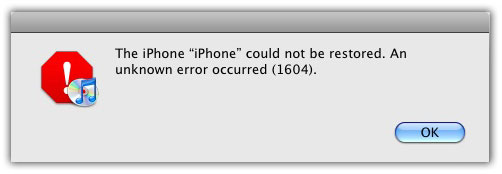
Since the release of Sn0wbreeze and PwnageTool that let you create custom firmware 4.0, 3.1.3 and older to jailbreak iPhone and iPod Touch, many of you has been asking on how to fix 1600, 1601, 1602, 1603, 1604 or 29 error during iPhone custom firmware restore.
This is what error reads:
 |
| iDevices News |
To get rid of error 1600, 1601, 1602, 1603, 1604 or 29 during custom firmware restore follow the steps mentioned below.
 Fix 16xx and 29 error During Custom Firmware Restore
We are listing all the possible fixes for 16.04, 16xx error when restoring a custom firmware below. Please read it first before trying.
Solution 1
I encountered 1604 error just once back in OS 3.1.2 days. Trying on another PC helped me in successfully restoring the CFW. So, if you have another PC or Mac, I suggest you to try on that computer first.
Solution 2
- Make sure to show hidden files under your folder options.
- Close the iTunes and disconnect your iDevice from your Computer.
- Go to the following directory:
Win 7 & Vista Users:
C:Users\*UsersName*\AppData\Roaming\Apple Computer\iTunes\Device Support
Windows XP :
C:\Documents and Settings\*UserName*\Application Data\Apple Computer\iTunes\Device Support or iPhone Software Updates - Backup the files available in the folder and delete them from that folder.
- Put your iPhone into Recover Mode. and Restore the Custom firmware.
Solution 3
iPhone 3G, 2G and iPod Touch 1G, iPod Touch 2G users running OS 3.1.2 can use a handy little utility named iREB (iTunes Restore Error Bypasser) to get rid of error 16xx or 29:
- Download iREB
- Start iTunes and put your iPhone into DFU mode:
Subscribe to:
Post Comments
(
Atom
)
No comments :
Post a Comment
leave your comments here-